The Playbook gives the team a clear plan.
Required steps and finish rules are clear before the job starts.
Guided product tour
Quotia keeps your checklist, photos, results, assignments, reviews, and report together so the team can finish work without chasing details.
Example job: a residential mold inspection from site visit to report.
How the job stays connected
Mold inspection — Unit 402
See the work move from the field to a finished report.
Need a closer look at a specific tool? Browse the full feature list.
01 · Playbooks
What gets in the way
Work goes off track when the process lives in documents, memory, and one experienced person’s head.
Set the job steps, required photos and files, owners, and finish rules before the team heads out.
Outcome
Every job starts with the same clear plan.
Playbooks / Mold inspection
Field evidence stage
Stage description
Collect the field evidence required to support Findings.
Completion rule
All required evidence must be complete
Required evidence
02 · Client jobs
What gets in the way
Site details, people, and progress get lost when work is split across folders and tools.
Start from a saved Playbook and keep the client, site, progress, people, photos, files, and report together.
Outcome
People can see the full job without hunting across tools.
Clearview Properties
Unit 402 mold inspection
Job snapshot
03 · Evidence
What gets in the way
Photos and files are hard to trust when no one can tell where they came from or why they were collected.
Add photos, files, readings, and notes at the step and place where they belong.
Outcome
Anyone can see what supports each finding and report.
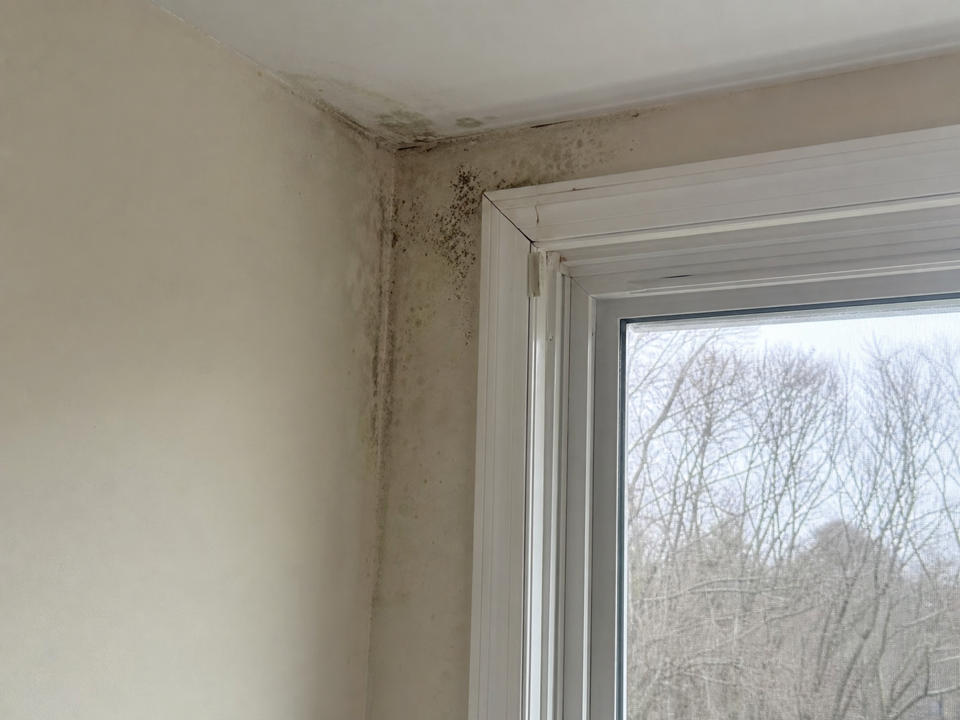
North bedroom window
CompleteRequired field photo · Field evidence
Evidence details
04 · Assignments
What gets in the way
Handoffs stall when people have to search for what needs attention next.
Give each person a job, review, or follow-up with the site details and files they need.
Outcome
Teams spend less time chasing updates and more time moving the job forward.
My work
Work and decisions assigned to you
Complete Findings
Unit 402 mold inspection
Review lab-supported findings
Due today · 3 findings
Confirm sample classifications
Ontario Indoor Air Laboratory
05 · Review & approval
What gets in the way
Feedback in email and chat makes it hard to see what changed, who approved it, and whether work can continue.
Ask the right person to review, capture their comments and approval, and hold the report until it is ready.
Outcome
Everyone can see what changed and who signed off.
Review request
Three findings ready for decision
Finding F1 · North bedroom window
Moisture staining and localized fungal growth were observed around the north bedroom window. Supporting photo and moisture readings are attached.
1 supporting photo
Lab report.pdf
Decision
Review the finding and supporting evidence.
06 · Reports
What gets in the way
Reports take too long when the team has to rebuild the job in a separate document.
Build a branded report from approved work and keep a clear history of every version.
Outcome
The final report stays connected to the photos, findings, and decisions behind it.
Northstar Environmental · Illustrative
Prepared for Clearview Properties
Finding F1
Moisture staining and localized fungal growth observed at the north window.
Document history
Every report version stays traceable
07 · Access & history
What gets in the way
Fast work still creates risk if people cannot see who had access, what changed, or who made the final call.
Limit access, keep a history of changes, and let people—not AI—make the final call.
Outcome
Teams can move quickly while protecting client work and staying in control.
Access and history
AI-assisted edit
Recommendation wording
Current
Repair the exterior seal and remove affected material.
Suggested
Repair the exterior seal, remove affected material, and document clearance sampling.
Nothing changes until a person approves it.
What keeps each job clear
Required steps and finish rules are clear before the job starts.
People, photos, files, findings, and decisions stay with one client job.
Reports and AI suggestions move forward only after the required human decision.
Start with a sample Playbook, adapt it to your service, and run the next client job without rebuilding the details across tools.