Job steps
Set up intake, fieldwork, review, and delivery in the order your team uses.
All features
Use one connected set of tools for job plans, photos, results, reviews, and client reports.
Want to see a real job move through the process? Start with the Product tour.
Features at a glance
One connected tool
Set the team up for a good job
What this helps you do
Each job starts with a plan the whole team can follow.
Seven connected groups
Each tool keeps the job details connected, so the team does not have to piece the work together later.
7
areas
35
features
1
job record
01 · Playbooks
Set the steps, required photos and files, owners, and finish rules before the job begins.
What this helps you do
Each job starts with a plan the whole team can follow.
Playbook preview
Mold inspection — Standard
Set up intake, fieldwork, review, and delivery in the order your team uses.
Tell the team which photos, files, readings, and answers they need at each step.
Show the right next step when an answer or result calls for it.
Keep a step open until the required work and decisions are complete.
Update future jobs without changing the plan a team is already using.
02 · Client jobs
Keep the client, site, job plan, people, progress, photos, files, and report together.
What this helps you do
Everyone can see what the job is, where it stands, and what must happen next.
Client job
Unit 402 mold inspection
Client
Clearview Properties
Location
42 Lakeshore Ave, Unit 402
Playbook
Mold inspection · v3
Current stage
Findings
Keep the client, site, contacts, scope, and service details with the job.
Use a saved job plan that stays the same while the team is working.
See what is done, in progress, blocked, and coming up next.
See the people doing the work and reviewing it beside the job they own.
Keep photos, files, findings, decisions, and reports on the same job.
03 · Evidence
Add photos, files, readings, and notes at the site and job step where they belong.
What this helps you do
Every finding and report can show the work, place, and person behind it.
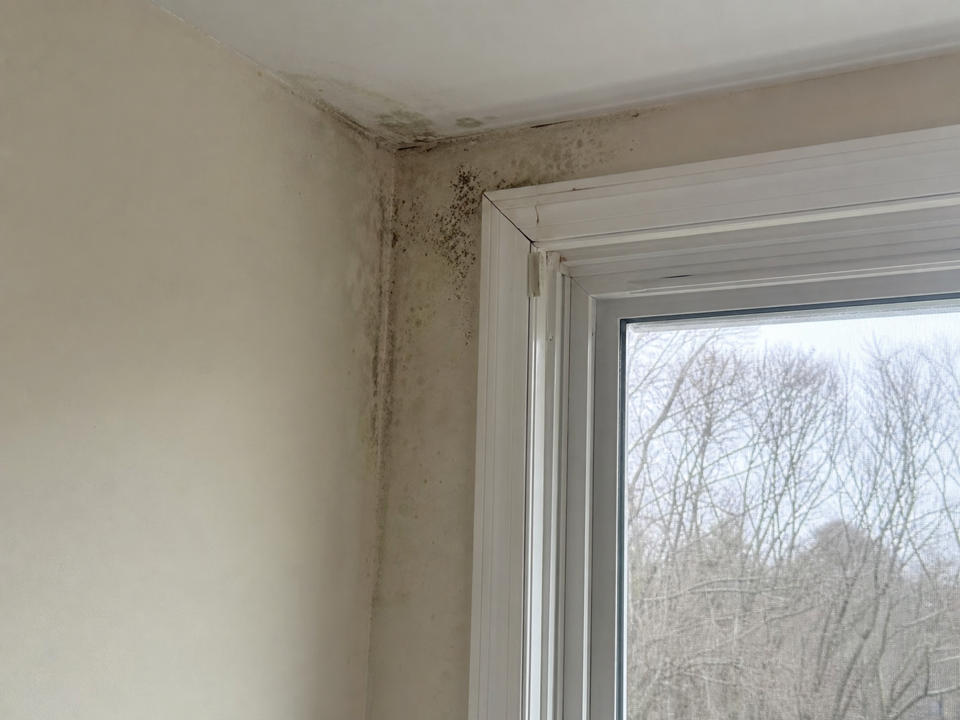
North bedroom window
CompleteRequired field photo · Field evidence
Evidence details
Add a purpose to each photo and file instead of dropping it into a generic folder.
Capture observations, measurements, selections, and notes beside the related photos and files.
Show what is still missing before the team moves to findings, review, or reporting.
Keep who added an item, when it was collected, and the site and step it supports.
Keep client files private and share them only with people who have access.
04 · Assignments
Assign job steps, reviews, and follow-ups without separating the task from the site and files it needs.
What this helps you do
People know what to do next, and managers can see where work is waiting.
Team work queue
Unit 402 · Open responsibilities
Complete findings
Review supported findings
Confirm classifications
Name the person responsible for each part of the job.
Show each person the work they can complete and the decisions they can make.
Send a review to the person who needs to make the decision.
See active work, waiting reviews, and completed tasks at a glance.
Pass work on with the job details, photos, files, and decision history still attached.
05 · Review & approval
Ask the right person to review, keep their feedback, and hold the next step until work is approved.
What this helps you do
The team can see what changed, who approved it, and why the report was ready to send.
Review request
Three findings ready for decision
Finding F1 · North bedroom window
Moisture staining and localized fungal growth were observed. Supporting photo and readings are attached.
Decision
Send the exact finding, photo, file, or report that needs a decision.
Keep feedback with the work and send back only what needs attention.
Record the approval instead of relying on silence or a chat message.
Hold the next step or report until the required decision is made.
Keep reviewers, dates, comments, and decisions with the job.
06 · Reports
Turn approved job details into a branded report, review edits, and keep a history of every version.
What this helps you do
The final report stays connected to the photos, findings, and approvals behind it.
Report record
Mold inspection report
Northstar Environmental · Illustrative
Mold inspection report
42 Lakeshore Ave, Unit 402
Findings overview
Three approved findings gathered from the job details.
Version history
Approved client report
Finding updates applied
Initial generated draft
Build client-ready content from the approved details already captured in the job.
Use consistent headings, sections, company details, and client-facing presentation.
Keep each report version so the team can see what was sent and when.
Apply AI suggestions only after a person accepts the change.
Send a report only after required work and approvals are complete.
07 · Access & history
Control who can see client files, keep the history of changes, and let people—not AI—make the final call.
What this helps you do
Teams move faster while keeping client work private and under control.
Access and history
AI suggestion
Clarify the moisture-source recommendation before client delivery.
No change is applied without approval.
Limit actions and file access based on a person's role and assignment.
Protect uploaded files and share them only with approved people.
Keep past and active jobs tied to the plan they actually used.
Keep the important actions, decisions, and report versions behind the client output.
Let a person accept, reject, or edit every AI suggestion.
Features show the tools. Product shows the job.
Bring your process, proof, and report into one place
Start with a sample Playbook, adapt it to your service, and run the next client job with every detail in one place.